






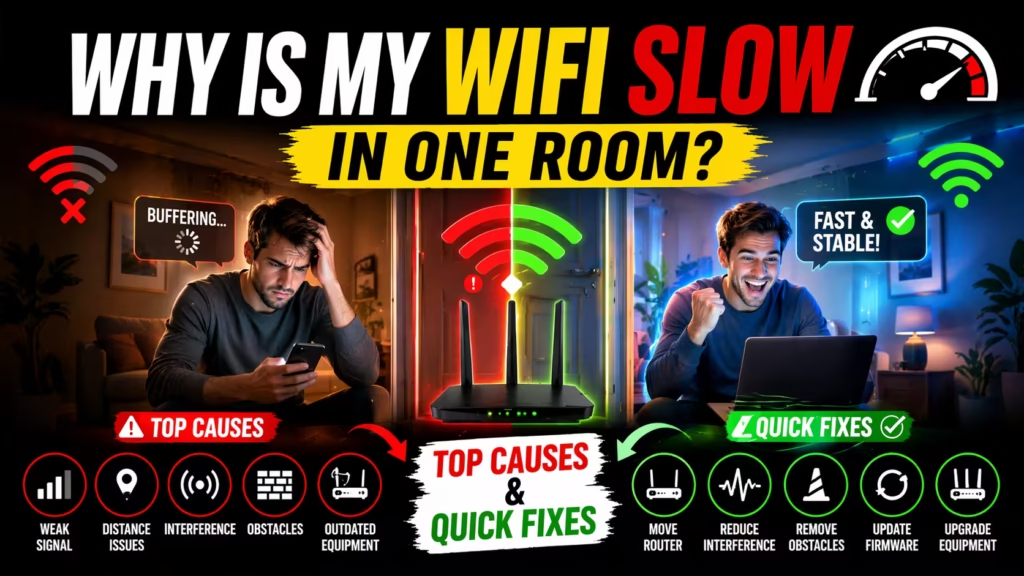
Why Is My Wifi Slow In One Room?
Have you ever walked from your living room to your bedroom and suddenly noticed your wifi speed drop? Maybe videos buffer, web pages load slowly, or your video call freezes. You’re not alone. Many people find that their wifi works well in one room, but slows down or becomes unreliable in another. This can be both confusing and frustrating, especially when you need fast internet everywhere in your home.
The good news is that slow wifi in one room isn’t just bad luck. There are clear reasons why this happens, and most of them are easy to understand and fix. In this article, we’ll explore all the main causes of weak wifi in one room, how to test your connection, and proven solutions to get fast, reliable internet in every corner of your house.
You’ll also find practical tips, expert advice, and answers to the most common questions people have about this problem.
Understanding Wifi Signals In Your Home
Wifi sends radio waves from your router to your devices. These waves travel through walls, floors, and furniture. But not all rooms are equal. Some rooms have strong signals, while others may have dead zones or weak spots. The signal strength can be affected by:
- Distance from the router
- Building materials
- Interference from other electronics
- The type and age of your router
Wifi signals are similar to sound: the further you are from the source, and the more barriers between you and the source, the quieter (or weaker) it gets.
How Wifi Routers Work
Your router sends out signals in all directions. The strength is usually strongest close to the router and gets weaker as you move away. Routers are often placed in a central spot, but sometimes they’re hidden in a corner, behind furniture, or even inside a closet.
Where you put your router makes a big difference.
Common Wifi Problems By Room
Some rooms, especially those far from the router, may experience slower speeds or unstable connections. Kitchens, basements, and rooms with thick walls are often trouble spots. Even the layout of your home can change how wifi travels.
Main Causes Of Slow Wifi In One Room
There are several reasons why your wifi might be slow in only one part of your home. Let’s break down each cause and explain how it affects your internet.
1. Distance From The Router
Wifi signals get weaker as you move further from the router. If your problem room is far away (for example, upstairs or at the back of the house), the signal may not be strong enough for fast speeds. Even small changes in distance can have a big impact.
2. Obstructions And Building Materials
Walls, floors, and ceilings can block or weaken wifi signals. Some materials are worse than others:
- Concrete and brick are very difficult for signals to pass through.
- Metal (like pipes or appliances) reflects or absorbs the signal.
- Thick wooden walls or doors can also reduce signal strength.
If the slow room is separated by several walls or a floor, or if it’s near the kitchen (with lots of metal appliances), your wifi may struggle to reach.
3. Interference From Other Electronics
Many devices in your home can interfere with wifi. Microwaves, cordless phones, baby monitors, and even Bluetooth devices use similar frequencies and can disrupt your signal. This is especially true for the 2.4 GHz band, which is more crowded.
4. Router Placement
Where you put your router matters. If it’s on the floor, behind a TV, or hidden in a closet, the signal will be weaker. For the best coverage, place your router:
- As central in your home as possible
- High up (on a shelf)
- Away from thick walls and large metal objects
5. Outdated Router Or Devices
Older routers may not support the latest wifi standards (like WiFi 5 or WiFi 6). Devices from before 2014 may also have weaker wifi antennas. If you’re using old equipment, it might struggle to provide fast, stable connections in every room.
6. Overloaded Network
If too many devices are using your wifi at once, especially streaming or gaming, the available bandwidth is shared. Rooms further from the router usually feel the slowdown first.
7. Neighboring Wifi Networks
In apartments or crowded neighborhoods, your neighbor’s wifi can overlap with yours. This causes signal congestion, reducing speed, especially on the 2.4 GHz band.
8. Faulty Wiring Or Poor Electrical Setup
Some homes have poor or old electrical wiring, which can affect powerline adapters or even cause interference with your wifi signal. This is often overlooked but can be a hidden cause of slow speeds.
9. Bad Wifi Channel Selection
Routers use different channels to send signals. If your router is on a busy channel (used by many neighbors), you may experience slowdowns in certain rooms. Some routers pick channels automatically, but not always well.
10. Software Or Firmware Issues
Sometimes, your router or device needs a firmware update. Bugs or outdated software can cause slowdowns, dropped connections, or poor performance in certain areas.
How To Test And Diagnose Wifi Problems In One Room
Before you fix your wifi, you need to find out what’s wrong. Here’s how to test your connection and understand the issue.
Step 1: Test Your Speed In Different Rooms
Use a speed test app (like Speedtest. net or Fast. com) on your phone or laptop. Test in the room with good wifi, then in the slow room. Compare the download and upload speeds.
- If the speed drops a lot in one room, it’s likely a signal strength issue.
- If speed is slow everywhere, the problem is probably your internet plan or router.
Step 2: Check Signal Strength
Most devices show wifi bars. For a more precise check, use a wifi analyzer app. These apps show signal strength (measured in dBm). Anything below -70 dBm is considered weak.
Step 3: Move Your Router Temporarily
Move your router closer to the slow room and test again. If speeds improve, you know distance or obstructions are the main issue.
Step 4: Turn Off Competing Devices
Unplug or turn off other electronics near the slow room (like microwaves, cordless phones, or Bluetooth speakers). See if your speed improves.
Step 5: Check For Outdated Devices
Try a speed test with a newer device. If newer devices perform better, your old device’s wifi may be the problem.
Solutions For Fixing Slow Wifi In One Room
You don’t have to live with slow wifi. Here are proven solutions, from simple fixes to more advanced upgrades.
1. Move Or Reposition Your Router
Placing your router in a central, elevated location can make a big difference. Avoid corners, closets, and low shelves. If your slow room is far away, try moving the router closer to the center of your home.
2. Reduce Interference
Keep your router away from:
- Microwaves
- Cordless phones
- Baby monitors
- Large metal objects
Switch to the 5 GHz band if your router supports it—this band is less crowded and less prone to interference.
3. Upgrade Your Router
If your router is several years old, consider upgrading to a newer model that supports WiFi 5 (802.11ac) or WiFi 6 (802.11ax). Modern routers have better range, speed, and can handle more devices.
4. Use A Wifi Extender Or Repeater
A wifi extender or repeater picks up your existing signal and rebroadcasts it. Place it halfway between your router and the slow room. This can help fill in dead zones, though speeds may not be as fast as the main router.
5. Switch To A Mesh Wifi System
Mesh systems use multiple devices (nodes) placed around your home. They communicate with each other to give you strong, seamless wifi everywhere. Mesh is the best choice for large homes or those with thick walls.
If you want to learn more about the best mesh wifi systems, check out the in-depth guide at Best Mesh WiFi System for Large Homes.
6. Update Router Firmware
Check your router’s settings for firmware updates. Updated firmware can fix bugs, improve speed, and add new features.
7. Change Wifi Channel
Use a wifi analyzer app to see which channels are crowded. Log in to your router and switch to a less-used channel for better performance.
8. Upgrade Problem Devices
If only one device is slow, it may have an old or weak wifi adapter. Upgrading to a new laptop or adding a USB wifi adapter can solve the problem.
9. Use Wired Connections
For important devices (like a desktop PC or smart TV), use an Ethernet cable if possible. Wired connections are always faster and more reliable.
10. Add Powerline Adapters
Powerline adapters use your home’s electrical wiring to send internet to far rooms. Plug one adapter near your router and another in the slow room. This can be a good alternative if wifi doesn’t reach.

Comparing Solutions: What Works Best?
To help you choose the right fix, here’s a simple comparison of the most common solutions for slow wifi in one room:
| Solution | Cost | Difficulty | Effectiveness | Best For |
|---|---|---|---|---|
| Reposition Router | Free | Easy | Moderate | Minor coverage issues |
| Wifi Extender | Low | Easy | Good | One or two dead zones |
| Mesh System | High | Moderate | Excellent | Large or multi-story homes |
| Update Firmware | Free | Easy | Moderate | Bug or performance fixes |
| Powerline Adapter | Medium | Moderate | Good | Thick walls, far rooms |
What About Internet Service Provider (isp) Issues?
Sometimes, your internet plan or the service from your ISP is the problem. If your plan offers low speeds, or if your ISP has network issues, no amount of wifi tweaking will help. Check your speed at the router using a wired connection. If it’s slow, call your ISP for help.
Real-world Example: Solving Slow Wifi In A Bedroom
Let’s look at a real example. Sarah lives in a two-story house. Her router is in the living room downstairs. Her son’s bedroom, upstairs at the back of the house, always has slow wifi.
Sarah tried moving the router, but it didn’t help enough. Using a wifi analyzer app, she saw the signal was very weak in the bedroom. She installed a wifi extender halfway up the stairs. This improved the connection, but her son still had issues during video calls.
Sarah decided to upgrade to a mesh wifi system. She placed one node in the living room and another in the upstairs hallway. The bedroom now has fast, stable wifi, and streaming works perfectly.
For more on how mesh systems solve these problems, visit Best Mesh WiFi System for Large Homes for detailed reviews and recommendations.
Hidden Causes Beginners Often Miss
When people try to fix slow wifi, they often overlook two important factors:
- Device Placement: Even small changes—like moving a laptop from the floor to a desk—can improve signal strength.
- Firmware Updates: Many routers work better and more securely after a quick firmware update, but most people never check for updates.
Another common mistake is ignoring electronic interference from things like wireless speakers, smart home devices, or even thick aquarium glass!
Data On Wifi Speed Loss By Distance And Obstacles
How much do walls and distance really affect wifi speed? Here’s a quick reference:
| Situation | Average Speed Loss (%) |
|---|---|
| 1 Room Away (Drywall) | 10-20% |
| 2 Rooms Away (Drywall) | 30-40% |
| Through Brick Wall | 50-70% |
| Through Floor/Ceiling | 30-50% |
| Line-of-Sight (No Obstacles) | 0-5% |
As you can see, thick walls and multiple barriers quickly reduce wifi performance.
How To Future-proof Your Home Wifi
If you want fast wifi everywhere—not just today, but for years to come—consider these steps:
- Invest in a mesh wifi system if your home is large or has many obstacles. For more information, see Best Mesh WiFi System for Large Homes.
- Update your router every 4-5 years.
- Use both 2.4 GHz (longer range) and 5 GHz (faster speed) bands.
- Place nodes or extenders in open, central spots.
- Regularly check for firmware updates.
- Limit the number of smart devices on your main network, or create a separate guest network.

When To Call A Professional
If you’ve tried all the DIY steps and still have one room with slow wifi, it might be time to call in an expert. Network specialists can use advanced tools to map signal strength and recommend the best solution for your unique home layout.
Sometimes, professional wiring or advanced mesh solutions are the only way to fix tricky dead zones.
Frequently Asked Questions
Why Is My Wifi Fast In One Room But Slow In Another?
The main reasons are distance from the router, walls and obstacles, interference from electronics, and poor router placement. The further you are from the router—and the more walls in between—the weaker the signal becomes.
Can A Wifi Extender Fix Slow Wifi In One Room?
A wifi extender can help boost the signal to a weak area. Place it halfway between your router and the slow room for best results. However, speeds may not be as fast as a direct connection to the router or a mesh system.
Is Mesh Wifi Better Than Traditional Routers For Large Homes?
Yes, mesh wifi is much better for large or multi-story homes. Multiple nodes cover more area and deliver seamless wifi without dead zones. For the best mesh options, see Wikipedia: Mesh Networking.
Can My Neighbors’ Wifi Make My Wifi Slow?
Yes. If many neighbors use the same wifi channel or frequency, it can cause congestion and slow speeds. Changing your router’s channel can help.
How Often Should I Upgrade My Wifi Router?
Most experts recommend replacing your router every 4 to 5 years to keep up with new technology and security updates. If you experience frequent slowdowns, an upgrade may help.
No one likes slow wifi, especially when it only happens in one room. With the right information and solutions, you can enjoy fast, reliable internet everywhere in your home. Don’t forget to review your setup regularly and upgrade when needed—your future self (and your streaming videos) will thank you.