




For many people, a slow or weak WiFi signal can be frustrating. Whether you are working from home, streaming movies, or playing online games, you need strong and stable internet. When you have a large house or thick walls, your WiFi signal often struggles to reach every room. This is where devices like mesh WiFi systems and router extenders come in. Both promise better coverage, but they work in different ways. Understanding these differences helps you choose what’s best for your home.
Many believe that simply adding an extender will fix all WiFi problems. Others think mesh WiFi is only for tech experts or huge houses. But the truth is more nuanced. Each solution has strengths and weaknesses, and the best choice depends on your needs, budget, and the layout of your home.
By the end of this article, you’ll clearly see how mesh WiFi compares to router extenders, how each works, and which is right for you.
What Is Mesh Wifi?
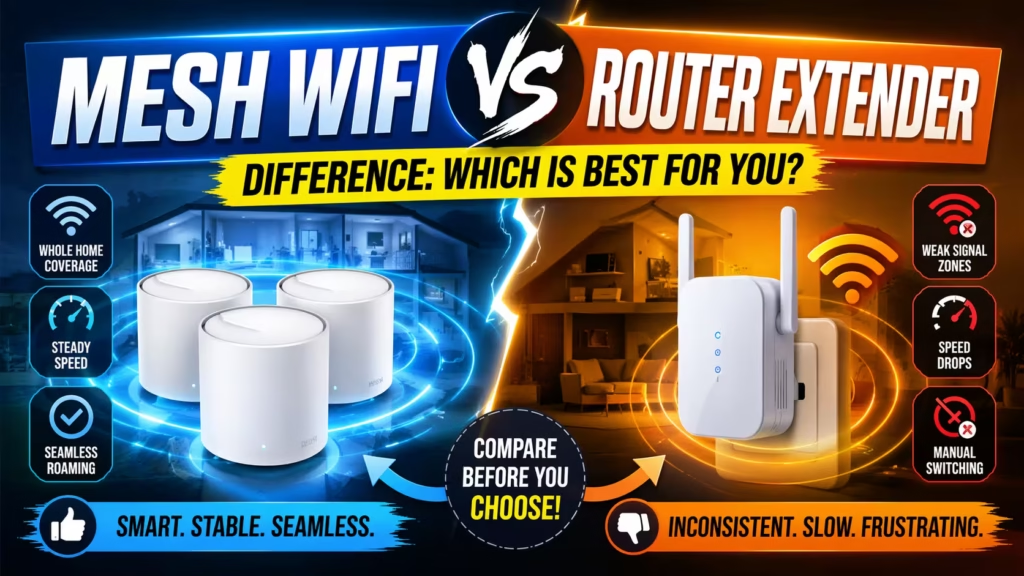
Mesh WiFi is a system made up of a main router and several satellite nodes. These devices work together as a single wireless network. Unlike traditional routers, where all devices connect to one point, mesh networks allow your devices to connect to the nearest node, creating seamless coverage across your entire home.
How Mesh Wifi Works
A mesh system starts with a main router that connects directly to your modem. Additional nodes, sometimes called satellites, are placed in different rooms or floors. All the nodes communicate with each other, sharing the internet connection. This creates a single, unified WiFi network. As you move through your house, your phone or laptop automatically switches to the nearest node for the best signal. You don’t need to manually change networks.
Mesh WiFi often uses technologies like MU-MIMO (Multi-User, Multiple-Input, Multiple-Output) and band steering. These help manage traffic and direct your devices to the best frequency band, reducing slowdowns when many people use the internet at once.
Key Features Of Mesh Wifi
- Whole-home coverage: Mesh WiFi can cover very large areas, up to 6,000 square feet or more, depending on the number of nodes.
- Seamless roaming: No need to switch WiFi networks as you move around.
- Centralized management: Most mesh systems use an app for easy setup and network control.
- Automatic updates: Many mesh systems update themselves with new features and security patches.
- Expandable: You can add more nodes to cover extra rooms or outdoor spaces.
When To Consider Mesh Wifi
Mesh WiFi is ideal if you have:
- A large house (2,000+ square feet)
- Multiple floors
- Many thick walls or obstacles
- Frequent issues with dead zones
- Many connected devices at once
If you need more details on mesh systems for large homes, see the Best Mesh WiFi System for Large Homes article, which reviews top-rated mesh WiFi options for spacious houses.
What Is A Router Extender?
A router extender (sometimes called a WiFi repeater or booster) is a smaller device that picks up your existing WiFi signal and rebroadcasts it to areas with weak coverage. Extenders are often a more budget-friendly way to stretch your WiFi to the far ends of your home.
How Router Extenders Work
The extender plugs into a wall socket between your main router and the area with poor signal. It receives the WiFi signal from your router and then sends out its own signal. This helps extend coverage, but it’s important to know that many extenders create a separate network name (SSID) by default. For example, your main network might be “HomeWiFi,” and the extender might create “HomeWiFi_EXT.” This means you may need to switch networks as you move around your house.
Some modern extenders can use the same network name through a feature called SSID cloning, but performance can still vary depending on placement and interference.
Key Features Of Router Extenders
- Affordable: Usually much cheaper than mesh systems.
- Simple installation: Plug in and follow basic setup instructions.
- Flexible placement: Can be moved to different outlets as needed.
- Works with existing routers: No need to replace your current setup.
When To Consider A Router Extender
Extenders are a good choice if you:
- Have a smaller home or apartment
- Only need to fix a single dead zone (like a basement or attic)
- Want a low-cost solution
- Don’t mind switching WiFi networks as you move
For homes with complex layouts or thick walls, extenders may help, but may not offer the same seamless experience as mesh WiFi.
Core Differences: Mesh Wifi Vs Router Extender
Understanding the key differences between mesh WiFi and router extenders is crucial. Here’s a detailed look at how they compare across the most important factors.
| Feature | Mesh WiFi | Router Extender |
|---|---|---|
| Network Coverage | Whole-home, seamless | Partial, may create separate zones |
| Network Name | Single SSID | Often separate SSIDs |
| Performance | Consistent, fast speeds | May reduce speed, especially far from router |
| Scalability | Easy to expand with more nodes | Limited; adding more extenders can cause interference |
| Setup | App-based, guided | Manual, can be tricky for some users |
| Cost | Higher | Lower |
| Roaming | Automatic, seamless handoff | Manual, may require switching networks |
| Best For | Large/multi-story homes | Small homes, spot coverage |
Network Coverage
Mesh WiFi is designed to blanket your entire home with a strong, consistent signal. Each node communicates with others, forming a web of coverage. In contrast, a router extender simply rebroadcasts the signal from your main router. This often creates areas with good signal close to the extender, but can also cause dead spots or areas with slow speeds between the router and extender.
Network Name And Seamless Roaming
Mesh networks use a single SSID across all nodes, making it easy for your devices to stay connected as you walk around. Most extenders, on the other hand, create their own SSID, so your device may cling to a weak signal instead of switching, unless you manually select the new network.
Speed And Performance
Mesh systems usually keep speeds high throughout your home because the nodes use dedicated channels to communicate. Some advanced mesh systems, like WiFi 6 models, support tri-band technology, dedicating one band to node-to-node communication, which greatly improves performance.
Router extenders, however, often cut your speed in half. This is because they use the same radio to receive and send data. This is especially noticeable when streaming or gaming far from your main router.
Scalability
With mesh WiFi, adding coverage is as easy as plugging in another node. The system automatically adapts. Extenders can also be added, but having too many can confuse devices and cause interference, leading to dropped connections.
Setup And Management
Most mesh systems come with user-friendly apps that guide you through setup, help you find the best node placement, and allow you to manage your network. Extenders are usually set up through a web browser or by pressing a WPS button, but troubleshooting can be more complicated if things go wrong.
Cost
Mesh WiFi systems are a bigger investment, often costing between $200 and $500 for a full setup. Router extenders are much cheaper, usually from $30 to $100 each. For large homes, the improved performance and coverage of mesh WiFi often justify the higher price. You can find some budget mesh options reviewed in the Best Mesh WiFi System for Large Homes article.
Real-world Examples
Mesh Wifi In Action
Imagine a two-story house with thick brick walls. The main router sits in the living room, but the upstairs bedrooms have weak or no signal. By installing a mesh system, you place one node in the hallway upstairs and another in the kitchen.
Now, every room has fast internet, and you can walk around on a video call without losing connection.
Router Extender In Action
Suppose you live in a smaller home, but your WiFi can’t reach the garage. You plug a router extender into an outlet halfway between the router and garage. Now you can stream music while working on your car. However, if you walk from the living room (main router) to the garage (extender), you may need to switch networks manually.

Pros And Cons Of Mesh Wifi
Advantages
- Consistent coverage: Mesh WiFi eliminates dead zones, even in large or oddly shaped homes.
- Easy expansion: Just add more nodes to cover more space or outdoor areas.
- Simple management: Control everything from a smartphone app.
- Better performance: Advanced features like band steering and automatic updates keep your network running smoothly.
- Unified experience: No need to switch networks as you move.
Disadvantages
- Higher cost: Initial investment is much greater.
- Complexity: More devices to place and manage, though setup is usually simple.
- Overkill for small homes: If you live in a small apartment, mesh WiFi may be more than you need.
Pros And Cons Of Router Extenders
Advantages
- Affordable: Great for boosting signal in one or two problem areas.
- Simple setup: Most extenders are plug-and-play.
- Works with existing routers: No need to buy new equipment.
- Portable: Can be unplugged and moved if your needs change.
Disadvantages
- Possible speed loss: Many extenders cut your bandwidth in half.
- Separate networks: May require switching between SSIDs.
- Limited coverage: Not suitable for very large homes.
- Interference: Adding multiple extenders can cause signal overlap and dropped connections.
How To Choose: Mesh Wifi Or Router Extender?
Selecting the right solution depends on your unique situation. Here are key points to consider:
Size And Layout Of Your Home
- Large, multi-story, or oddly shaped homes: Mesh WiFi is the clear winner. It provides reliable coverage everywhere, including basements, garages, and outdoor areas.
- Small homes or apartments: A single router or a router extender is often enough.
Number Of Devices
Modern households often have dozens of connected devices, from phones and laptops to smart TVs and thermostats. Mesh WiFi systems handle many devices better because they spread the load across multiple nodes and use advanced management features.
Internet Speed
If you pay for fast internet (200 Mbps or more), you want to enjoy those speeds everywhere. Mesh WiFi usually delivers much higher speeds across your whole home. Extenders may bottleneck your connection, especially at the edges.
Budget
- Low budget: Router extenders are much cheaper and can solve basic coverage problems.
- Willing to invest: Mesh WiFi is a better long-term solution, especially if you plan to add more smart devices in the future.
Ease Of Use
Mesh systems are designed for non-technical users, with guided setup, automatic updates, and easy management through apps. Some extenders are also easy to set up but may require more manual management if you have multiple.
Future-proofing
As homes get smarter, with more connected gadgets, mesh WiFi is better suited to handle future demands. Many mesh systems already support the latest WiFi 6 or even WiFi 6E standards.
If you’re still unsure, the Best Mesh WiFi System for Large Homes article provides in-depth reviews and comparisons of mesh WiFi systems, making it easier to find the right match for your space and needs.
Advanced Features: A Closer Look
Mesh Wifi Features
- Self-healing: If one node goes offline, your data finds another path to the internet.
- Parental controls: Many mesh systems let you pause internet for specific devices or set schedules.
- Guest networks: Easily create a separate network for visitors.
- Voice assistant integration: Some mesh systems work with Alexa or Google Assistant.
- Smart home compatibility: Mesh nodes can act as smart home hubs.
Router Extender Features
- Ethernet ports: Some extenders let you plug in wired devices for stable connections.
- Dual-band support: Offers both 2.4 GHz and 5 GHz frequencies for better compatibility.
- WPS button: For fast, hassle-free setup.
Common Mistakes To Avoid
Mesh Wifi
- Placing nodes too close or too far apart: For best results, nodes should be within range of each other but not so close that their signals overlap.
- Ignoring firmware updates: Always keep your mesh system updated for security and performance.
- Overbuying: Don’t buy more nodes than you need; too many can cause interference.
Router Extender
- Placing the extender too far from the router: If the extender can’t get a strong signal, it can’t rebroadcast effectively.
- Using multiple extenders without planning: Too many can cause interference and actually make coverage worse.
- Expecting miracles: Extenders help with coverage, but they can’t fix all speed or reliability issues.
Data And Statistics
- According to Statista, the average US household had 25 connected devices in 2022.
- PCMag testing found that mesh WiFi maintained over 70% of base internet speed even 60 feet from the main router, while extenders often dropped to 40% or less.
- Mesh WiFi systems can cover up to 6,000 square feet with three nodes, while most extenders only add about 1,200 square feet of coverage.
- A 2023 survey by Consumer Reports showed that 82% of mesh WiFi users were satisfied with their network, compared to 59% of extender users.
These numbers show why mesh WiFi is becoming more popular, especially in homes with many users and devices.
Security Considerations
Mesh Wifi
Mesh systems often receive automatic security updates. Many also offer built-in security features, like blocking malicious websites or alerting you to suspicious activity on your network.
Router Extender
Security on extenders depends on your main router. If your router has weak security, the extender repeats those same risks. Some cheap extenders may not support the latest encryption standards like WPA3.
Environmental And Power Considerations
Mesh WiFi nodes usually need to be plugged into a power outlet and should be placed in open areas for best performance. Extenders are similar but are smaller and more portable. Both add a small amount to your home’s energy use, but it’s usually less than 10 watts per device.

Expert Recommendations
If you want the best possible coverage and performance, especially in a large or busy home, mesh WiFi is worth the investment. It’s future-proof, easy to manage, and handles many devices smoothly. Extenders are fine for small, simple fixes, but they can’t match the seamless experience of mesh.
Before making your decision, map out your home’s trouble spots. Think about how many devices you use and your speed needs. If you have a home office, smart security cameras, or plan to add more connected devices, mesh WiFi is the smarter choice.
You can also check out a detailed guide from PCMag for technical explanations and real-world testing results.
Frequently Asked Questions
What’s The Main Difference Between Mesh Wifi And A Router Extender?
Mesh WiFi uses multiple nodes to create a single, seamless network across your home. You get strong coverage everywhere, and your devices switch automatically between nodes. A router extender simply rebroadcasts your router’s signal, often with a separate network name.
This can help in small areas, but coverage and speed are usually lower than with mesh WiFi.
Does Mesh Wifi Replace My Existing Router?
Yes, most mesh WiFi systems are designed to fully replace your current router. The main node connects directly to your modem. All other nodes connect wirelessly or via Ethernet. You control the whole system from a central app, so there’s no need to keep your old router running.
Can I Use Multiple Extenders With One Router?
You can, but it’s not always recommended. Adding too many extenders can cause interference, slow speeds, and connection drops. Mesh WiFi handles expansion much better because each node communicates intelligently with the others.
Will A Mesh Wifi System Work With Any Internet Provider?
Yes, mesh WiFi works with almost any internet provider. All you need is a modem. Simply connect the main mesh node to your modem and follow the setup instructions. For more details on compatibility and recommended systems, see the Best Mesh WiFi System for Large Homes article.
Do Mesh Wifi Systems And Extenders Use More Electricity?
Both use a small amount of electricity, usually less than 10 watts per device. Mesh systems may use slightly more because they have multiple nodes, but the difference in your electricity bill is very small.
Making the right choice between mesh WiFi and router extenders can save you time, money, and frustration. If you want reliable, fast internet in every room, mesh WiFi is usually the better investment. But for smaller spaces or simple fixes, a good extender can still do the job.
Consider your needs, budget, and future plans to choose wisely.